
Beyond Pixels: The Strategic Power of a Site Redesign
In today’s fast-evolving digital landscape, your website is more than an online brochure — it’s your storefront, lead generation engine, and brand ambassador. If your current website feels outdated, slow, or misaligned with your goals, it may be time for a strategic site redesign.
A successful site redesign goes beyond aesthetics. When executed correctly, it improves user experience (UX), protects SEO rankings, increases conversions, and supports long-term business growth.
This guide walks you through how to redesign your website without sacrificing search engine performance.
Why Invest in a Site Redesign?
Businesses pursue a site redesign for several key reasons:
- Outdated visual design
- Poor mobile responsiveness
- Slow load times
- High bounce rates
- Low conversion rates
- Difficult navigation
- Brand repositioning
- SEO performance decline
A strategic redesign aligns your website with modern standards, improves usability, and strengthens your digital marketing foundation.
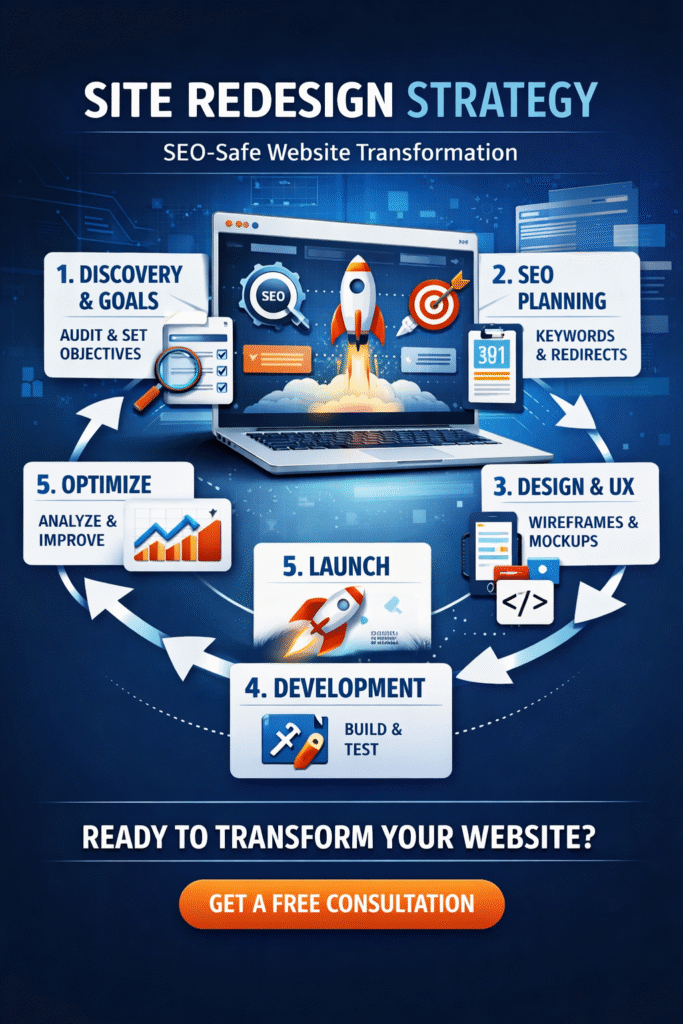
The Complete Site Redesign Roadmap
1. Discovery & Goal Setting
Before starting your site redesign, define measurable goals:
- Increase leads by 20%
- Improve page load speed to under 2 seconds
- Reduce bounce rate by 15%
- Increase organic traffic
Conduct:
- Website audit
- SEO audit
- Competitor analysis
- User behavior analysis
- Conversion funnel review
Clear objectives ensure your redesign delivers measurable ROI.
2. SEO Strategy: Protect Your Rankings
One of the biggest risks during a site redesign is losing SEO rankings. Avoid this with a proactive SEO plan.
Essential SEO Safeguards:
✔ Conduct updated keyword research
✔ Preserve high-performing pages
✔ Map and implement 301 redirects
✔ Optimize meta titles and descriptions
✔ Maintain proper URL structure
✔ Improve internal linking
✔ Optimize images
✔ Submit updated XML sitemap
✔ Monitor Google Search Console
SEO should be integrated from day one — not added after launch.
3. Content & Information Architecture
A redesign is the perfect opportunity to:
- Update outdated content
- Consolidate thin pages
- Improve keyword targeting
- Strengthen internal linking
- Simplify navigation
Clear information architecture improves both user experience and search engine crawlability.
4. Design & UX Optimization
Your new design should be:
- Mobile-first
- Fast-loading
- Accessible (WCAG compliant)
- Conversion-focused
- Clean and intuitive
Prioritize:
- Clear call-to-action buttons
- Strong visual hierarchy
- Simple navigation
- Optimized forms
Remember: A beautiful site that converts poorly is a failed redesign.
5. Development & Testing
Before launching your redesigned site:
- Test all redirects
- Validate structured data
- Check page speed
- Run mobile responsiveness tests
- Test forms and checkout flows
- Verify analytics tracking
Rigorous testing prevents costly post-launch problems.
6. Launch & Continuous Optimization
Launch is just the beginning.
After your site redesign:
- Monitor traffic daily
- Track keyword rankings
- Watch for crawl errors
- Review conversion metrics
- A/B test key pages
Continuous optimization ensures long-term performance growth.
Common Site Redesign Mistakes to Avoid
❌ Ignoring SEO until after launch
❌ Changing URLs without redirects
❌ Removing high-ranking pages
❌ Overcomplicating navigation
❌ Prioritizing design over performance
❌ Skipping mobile optimization
Avoid these pitfalls to ensure your redesign delivers results.
Frequently Asked Questions (FAQ)
1. How long does a site redesign take?
A small business site redesign typically takes 1–3 months, while large e-commerce or enterprise projects can take 6–12 months, depending on complexity.
2. Will I lose SEO rankings after a redesign?
You can lose rankings if SEO is not handled properly. However, with correct 301 redirects, optimized content, and technical SEO safeguards, traffic can be preserved — and often improved.
3. How much does a site redesign cost?
Costs vary widely:
- Basic redesign: $3,000–$10,000
- Mid-sized business site: $10,000–$50,000
- Enterprise-level: $50,000+
Pricing depends on functionality, integrations, content migration, and customization.
4. How often should a website be redesigned?
Most websites benefit from a major site redesign every 3–5 years, with ongoing optimization in between.
5. Should I choose a phased redesign or full overhaul?
- A full redesign works best for outdated or underperforming websites.
- A phased approach works well for large sites wanting minimal disruption.
6. What are the biggest risks of a site redesign?
The most common risks include:
- SEO traffic loss
- Broken links
- Poor user adoption
- Budget overruns
- Technical glitches
Strategic planning and expert execution significantly reduce these risks.
The Strategic Advantage of a Well-Planned Site Redesign
A successful site redesign strengthens your brand, improves search visibility, enhances user engagement, and increases conversions.
When approached strategically — with SEO, UX, and performance at the forefront — a redesign becomes a growth engine rather than a risk.
Ready to Redesign Your Website the Right Way?
Don’t risk traffic loss or wasted investment.
Partner with experts who prioritize SEO, performance, and measurable results.
👉 Contact us today for a free website audit and site redesign consultation.
Let’s transform your digital presence into a high-converting growth platform.